Beyond GUI: The Rise of the Embedded Interaction Interface (EII) in the AI Era
AI is pushing software beyond the screen. Embedded Interaction Interfaces (EII) will listen, understand, adapt, and help move work forward across meetings, email, documents, voice, and more—turning static dashboards into intelligent Focusboards.
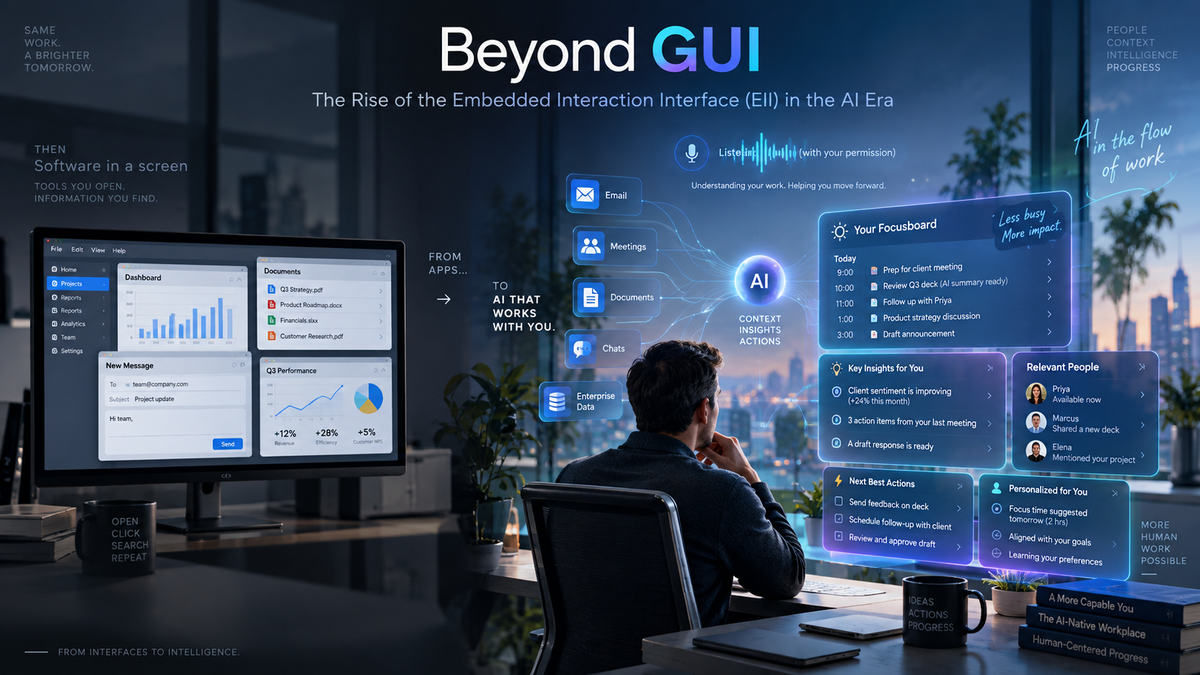
For decades, the Graphical User Interface or GUI has defined how we interact with software. We open an application, navigate menus, fill out forms, click buttons and review dashboards.
AI is beginning to challenge one of the GUI’s core assumptions: that interaction with software happens primarily through a screen.
AI-native systems can listen to conversations, understand emails, interpret documents, participate in meetings, observe workflows and interact with enterprise systems. They can also understand context, learn how individuals work and help move work forward.
That points to something broader than a better GUI. I call it the Embedded Interaction Interface — EII: an intelligent interaction layer embedded across the user’s flow of work. The graphical interface remains important, but it becomes only one of many ways humans and software interact.
I see this emerging through four fundamental shifts.
1. Multidimensional Input: Everything Can Become an Input
Traditional applications have narrow ways of understanding us. Most information reaches them because someone explicitly enters it through a field, file, option or click.
AI changes that dramatically.
An AI-native system can potentially understand voice, email, meetings, documents, messages, images, enterprise applications, external data and other AI agents. Anything you see, say, hear, read or touch can become input.
Consider a project management system. It may show Project Phoenix as green because the project manager entered that status last Friday. Since then, a vendor may have emailed that an integration will be delayed, an architecture team may have raised a scalability concern, and a revised plan may have moved a critical milestone.
None may have reached the project management application, yet together they describe the project’s real health far better than the green status in a database.
An EII can connect those signals, interpret their significance and surface the implications. Meetings make the shift especially visible. Someone asks, “Why is Phoenix expected to slip?” The AI can draw on the project plan, recent emails, prior discussions and dependencies. Someone follows with, “What happens if we add two engineers for six weeks?” The system runs the scenario.
The meeting itself has become part of the interface.
2. Always in the Flow: Listen, Understand and Respond
Traditional software is largely deaf until we engage with it. It does not know what happened in your meeting, what a vendor raised in an email, or that a document contradicts a recent decision.
With appropriate permissions and user control, an EII can listen to the flow of work, understand what is relevant and respond when useful.
“Listen” here is broader than audio. It means absorbing authorized context: an email thread, a document under review, changes in a project plan, a Teams discussion or events from enterprise systems.
Imagine someone says in a meeting, “The vendor says the API will be two weeks late.” The AI recognizes the critical milestone impact. Later, when testing is discussed, it can respond: “Moving testing by two weeks would affect the production date and two dependent projects. Would you like me to show the impact?”
No one switched applications. Nobody opened a planning screen. The interface was embedded in the conversation.
This is fundamentally different from a chatbot waiting for a prompt. The AI is present in the workflow, aware of permitted context and capable of contributing when that context becomes relevant.
Listen → Understand → Connect → Respond
But permission must be part of the interface. Users and organizations need control over what the system can observe, access, retain and when it may proactively intervene.
Ambient intelligence requires ambient consent. It also requires judgment. A good EII must know what to remember, what to surface and when to remain silent.
3. Made for Each Other: An Interface That Grows With You
Software personalization today is still crude. We customize dashboards, save filters and configure defaults. Different roles may receive different screens.
AI enables something much deeper.
Why should two people with the same role necessarily receive the same interface?
Two portfolio managers may think very differently. One may focus on budget variance and scenarios; another on milestones, dependencies and resources.
If both ask, “What is happening with Project Phoenix?”, the most useful starting point may differ. One could first see financial exposure; the other, schedule dependencies and resource bottlenecks.
The underlying information is the same. The cognitive entry point is personalized.
An EII can adapt to expertise, preferences, working style, behavior, goals, history, current context and the nature of the task. Most importantly, it can evolve.
A new portfolio manager may initially receive guidance. Months later, the system might say: “Three resource conflicts look unusual this week. I’ve put those first because that is typically where you start.”
This is not simply a personalized UI. It is an interface that learns its user.
Even expertise is contextual. A senior executive may need little explanation when reviewing financial performance but more guidance when evaluating cybersecurity exposure.
There is an important safeguard: personalization must not become a filter bubble. If the system learns that I usually focus on financials, it should not hide operational risks. A good system should adapt to how I think while occasionally challenging how I think.
That is more than personalization. It is advisory.
Not just made for you — growing with you.
4. Active Output: Every Output Becomes a Stepping Stone
In traditional applications, output is usually the end of an interaction. You run a report and get the report. You search and get results. What happens next is largely left to the user.
AI-native applications can change that relationship.
With an EII, the system can understand not only the result it has produced, but what that result implies and what the logical next step might be.
Suppose AI identifies three initiatives at serious risk. A traditional dashboard might highlight them in red. An EII could say: “Phoenix is the most urgent because its vendor delay affects two dependent projects. I’ve prepared three recovery scenarios.”
The analysis has not merely produced an answer. It has prepared the user for the next decision.
After the user reviews the options, the system might offer to prepare a revised recovery plan and, once approved, route it to the sponsor.
Output → Suggested Next Step → Human Review → Action → Next Context
The human remains in control. The AI does not need to autonomously decide where the workflow goes. It anticipates the logical next step, prepares it and presents it for approval.
Sometimes the right next step will be to pause, investigate further or do nothing. The goal is not to automate every outcome. It is to make output a useful bridge to what comes next.
Output is no longer the destination. It becomes the stepping stone.
So What Happens to the Dashboard?
If interaction changes this fundamentally, what happens to one of enterprise software’s most familiar artifacts — the dashboard?
Dashboards are useful, but largely passive. They show KPIs, charts, trends, alerts and exceptions. Their underlying message is: Here is what is happening. You decide what to do with it.
In an AI-native world, that may no longer be enough.
Perhaps the dashboard evolves into a Focusboard.
A Focusboard does not simply tell you what is happening. It helps you determine what deserves your attention, why it matters and how to move forward.
Instead of twenty charts, an executive might see: “Three things deserve your attention today: Project Phoenix has a new dependency risk, technology spending is trending above plan, and one strategic initiative may no longer justify its funding.”
From there, the user can explore: “Why is spending increasing?” “What changed since last week?” “What happens if we reduce Phoenix’s scope?” “Challenge my assumptions.” “What am I missing?”
The Focusboard can brainstorm, generate scenarios, bring in relevant context, surface alternative perspectives and identify blind spots. When the user reaches a decision, it can help move it forward.
The distinction is simple:
Dashboard: Here is what is happening.
Focusboard: Here is what deserves your attention. Let’s understand it, think it through and decide what to do next.
Because EII understands the individual, the Focusboard need not be the same for everyone — or even throughout one person’s day. Before an executive meeting it may become a decision board; during portfolio review, an exploration board; during a crisis, an action board.
The organizing principle shifts from information availability to attention and progress.
Beyond the Screen
Put these changes together and the transformation becomes clearer.
Multidimensional Input expands what the system can understand. Always in the Flow lets AI, with permission, listen to work as it happens and contribute at the right moment. Made for Each Other creates an interface that evolves with the individual. Active Output turns every result into a potential stepping stone toward the next decision or action. And the Focusboard turns information into attention, attention into thinking and thinking into progress.
The traditional GUI can be simplified as:
Input → Application → Output
The emerging EII looks more like:
Observe → Understand → Focus → Explore → Act → Learn
The GUI will not disappear. Screens remain excellent for visualization, comparison, precision and oversight. But the screen will no longer define the boundary of the application.
The GUI gave software a screen. Conversational AI gave software a voice. The Embedded Interaction Interface gives software the ability to listen, understand, think alongside us and participate in the environment where work actually happens.
AI will not simply redesign the applications we use. It may redefine what it means to interact with an application at all.